MarketGlory is a online browser game strategy game in which you have the possibility to convert your virtual currency into real money
THE STORY
A major unprecedented economic crisis has just hit the Earth 24 hours ago, and, according to our sources, the Governments cannot deal with its consequences. Apparently, all the major national banks have already entered into collapse, and the officials do not seem to know how to manage this situation. People have occupied the streets, and thousands are protesting in front of the Government and Parliament buildings. Most of the TV and radio stations have stopped broadcasting, and the main newspapers are under assault, as people are furious for not being told the truth about the state of things.
Although financial analysts have launched a series of warnings in the past five years in regard to the improper administration of funds and the constantly increasing amount of debt, Governments all over the world kept refusing to adjust their economic policy, while hiding the real consequences of their decisions. Instead of working to come up with a plan to stabilize the national economies, Governments chose to contract new debt, ignoring the long-term effects of this approach, and oblivious to the fact that assuming debt over and over again without being able to pay it, would not salvage, but crash the economy. The superficial attitude of the officials, and their inability to foresee the outcome of this disastrous lack of professionalism, as well as their devious manipulation techniques have contributed to this economic crisis that has now affected the global economy and caused riots in all the major cities of the world. Reports coming from all over the Earth state that an alarming violence wave has gotten out of control, as the military forces can no longer deal with the rage of people that have lost in just a day everything they worked for an entire life. As our informers have explained, what started out as peaceful demonstrations turned into utter and complete chaos, as information regarding the complexity of the crisis leaked.
The simultaneous fall of the Governments in countries across the Globe is a premiere - never in history have we witnessed such a fall of the mighty. Left with no money and no leaders to clear things up, it is no wonder that people react instinctively. One thing is a certainty - the past 24 hours turned out to be the most violent and confusing day of all times.
HOMEPAGE VIDEO
Update: Codename – MarketGlory
There is still hope! Just an hour ago, an official statement released by the spokesperson of the Secret Services shows that there might be a way to stop this chaos, as a recently declassified project designed by the brightest minds in the economical field could restore order. Known under the codename Market Glory, this project aims at developing and stabilizing the global economy. Afer more than 7 hours of negotiations, the Governments of the world have decided to adhere to the project proposed by the experts. It is official - from now on, the economical strategies will follow the same direction and use the same principles of transparency and correctitude, and countries will not be able to borrow money from each other in order to stop the vicious circle created by debt.
MarketGlory is a online browser game strategy game in which you have the possibility to convert your virtual currency into real money join now http://combostruct.com/5Bbm
War
You can select a country to attack, if you are a member of an Organization. In order to participate in the War, you need at least one Weapon of Attack, one Weapon of Defense and 20 points of Energy, and you need to travel to the country where the War takes place. Each Alliance/ Organization will have a ranking determined by the most valuable medals the members of the respective Alliance/ Organization own.
In order for the respective Alliance/ Organization to attack a territory, the Medal Ranking must be higher than the attacked territory's Ranking. If the organization's ranking is not higher, it will not be able to attack that territory.
on going war
The Rank of the territory is determined by its Warfund, active population, etc. A tax of 5 Gold will be paid to the WarFund, when an Organization bids on opening a war. In order to open a war, an Organization must bid on opening that war.
Each Organization which bids on opening a war will pay a fee of 5 Gold to the Warfund of that country. If there are more Alliances/ Organizations bidding on the same territory, the one with the highest attack damage will win the bid. If the territory is free, there must be at least two Alliances/ Organizations bidding for that war.
The Alliance/ Organization with the highest damage will become the attacker, while the other Alliance/ Organization will defend the territory. A territory can become free if the Alliance/ Organization which occupied it is dissolved.
If the rank of the country exceeds the rank of the Alliance/ Organization which occupies it, the Alliance/ Organization which holds that territory will fight in defense, along with the second bidder, from those Alliances/ Organization which bid for opening the war against that territory.
If the rank of the Alliance/ Organization is higher than the rank of the country they occupy, they will fight in defense, alone.
In defense, you can also fight as a Freedom Fighter, if you are a citizen of the country where the war takes place. In order to enter the war as a Freedom Fighter, you just need to click on “Fight” in that war.
ongoing war inside view
The Alliances/ Organizations will be able to bid on attacking a territory maximum 24 hours before the War begins, if the requirements to start the war are met. If 2 Alliances/ Organizations are needed for starting the war, the bid will be prolonged with another 12 hours. The title of Emperor will be given to the Leader of the Organization which gives the highest damage, on the winners’ side. All the territories will have a base defense of 100.000 points, no matter whose influence they are under.
The more wars you take part in, the more medals you can obtain, and you can obtain a higher military rank, which will allow you to create a greater damage in the future wars. The ranks in the Arena and the weapons you own will also determine the damage you create in a war.
The Warfund
will be distributed just once, at the end of the war. After the war ends, the country will benefit from protection for 7 days. During this period, the Warfund will accumulate, and when the country is involved in another war, the fund will be distributed again to the winners.
When an Alliance or Organization loses a war, each member of the respective Alliance/ Organization will lose the most valuable Medal they own. The same goes for the Freedom Fighters.
price for medal here
more high rank medal=more valuable the medal price
Final modifications on the War module
The Affiliates Fund distributes 1000 Gold daily to the Medals Fund.
All members of an Organization that have less than 10 Experience points or less than 1 Medal are automatically kicked out of the organization. The members of an Organization/Alliance or freedom fighters that lose a war, besides losing their highest medal, also lose 10 Experience points. - The position in the War Bid is decided according to the rank of the Organization/Alliance registered in the bid.
The hierarchy in the Organization is established according to the damage caused in the last 100 days. The member with the highest damage in that interval becomes the leader, and the following 9 members, also according to the damage caused in that interval, become veterans. Users are able to sell or convert all medals, not just the extra ones (the medals one owns besides those necessary for the military rank). Nevertheless, medals cannot be sold or converted if the Organization/Alliance a user belongs to is registered in the War bid or is participating in an ongoing war.
When expelled from the Alliance / Organization, the number of medals corresponding to the number of territories held by the Alliance / Organization are withdrawn. When a member of an Organization is expelled, he loses his top medals; when an Organization is expelled from the Alliance, the Organization/Alliance pays 50% of the highest medal's value.
Note
The military rank is not permanent - you are downgraded to an inferior rank if you do not have the necessary medals that need to be withdrawn, depending on the case in question (expulsion, losing the war etc). When you are downgraded, you get back 66% of the necessary medals for the rank from which you were downgraded. For example: If one has the Sergeant rank, and he/she does not have medals to be withdrawn, he/she is downgraded to Corporal, but receives 4 Corporal medals back, after the necessary medals are withdrawn, depending on the case (expulsion, losing the war etc).
When you reach a certain rank, all the medals corresponding to that rank are withdrawn. In order to reach the next military rank, you only need the medals required by that rank. For example: a user with the General rank will lose all his General medals, he will have the General rank, and in order to promote to Marshal he will need only those 15 Marshal medals. After he reaches the Marshal rank, the 15 medals will be withdrawn.
War Register
In order to open a war, an Organization must bid on opening that war. Each Organization which bids on opening a war will pay a fee of 5 Gold to the Warfund of that country. If there are more Alliances/ Organizations bidding on the same territory, the one with the highest attack damage will win the bid. If the territory is free, there must be at least two Alliances/ Organizations bidding for that war.
The Alliance/ Organization with the highest damage will become the attacker, while the other Alliance/ Organization will defend the territory. A territory can become free if the Alliance/ Organization which occupied it is dissolved.
If the rank of the country exceeds the rank of the Alliance/ Organization which occupies it, the Alliance/ Organization which holds that territory will fight in defense, along with the second bidder, from those Alliances/ Organization which bid for opening the war against that territory.
If the rank of the Alliance/ Organization is higher than the rank of the country they occupy, they will fight in defense, alone. In defense, you can also fight as a Freedom Fighter, if you are a citizen of the country where the war takes place. In order to enter the war as a Freedom Fighter, you just need to click on “Fight” in that war.
The Alliances/ Organizations will be able to bid on attacking a territory maximum 24 hours before the War begins, if the requirements to start the war are met.
If 2 Alliances/ Organizations are needed for starting the war, the bid will be prolonged with another 12 hours. The title of Emperor will be given to the Leader of the Organization which gives the highest damage, on the winners’ side.
All the territories will have a base defense of 100.000 points, no matter whose influence they are under.
The more wars you take part in, the more medals you can obtain, and you can obtain a higher military rank, which will allow you to create a greater damage in the future wars. The ranks in the Arena and the weapons you own will also determine the damage you create in a war.
The Warfund will be distributed just once, at the end of the war. After the war ends, the country will benefit from protection for 7 days. During this period, the Warfund will accumulate, and when the country is involved in another war, the fund will be distributed again to the winners.
Each time a war is opened, the highest medals of all members of the Organization/Alliance that registers in the bid will be withheld. After the Organization/Alliance enters the bid, its rank will be recalculated without the withheld medal, just the top ones that remained.
If the bid is lost, the withheld medals are given back to the members of the Organization/Alliance that lost the bid, and then its rank is calculated again. At the end of the war, each member of the Organization/Alliance that lost the war will lose their highest medal, as it was before.
When an Alliance or Organization loses a war, each member of the respective Alliance/ Organization will lose the most valuable Medal they own. The same goes for the Freedom Fighters.
Training Ground
The Training Ground is found in the Fight menu, and it is a section designed to help users gain experience in Wars, while earning medals.
In order to use the Training Ground, one has to meet the following criteria: have the rank of Recruit, have less than 3 medals, have at least 20 Energy points, and have one weapon of Attack, and one of Defense.
If you are part of an Organization, the damage caused in the Training Ground does not add to the damage caused by the Organization. When it comes to Training Ground hits, only the Energy and the weapons are taken into consideration. With each hit, the Energy decreases with 10%, and the weapons lose one use.
In a training session, you can accumulate all the medals, as you will not be excluded after the first three. Here, as well as when it comes to war, medals are granted according to the damage caused. The 10 000 damage bonus for the first hit does not apply in the Training Grounds. The simulation of a war will last for 24 hours starting from the first hit.
Organizations – Local Organizations
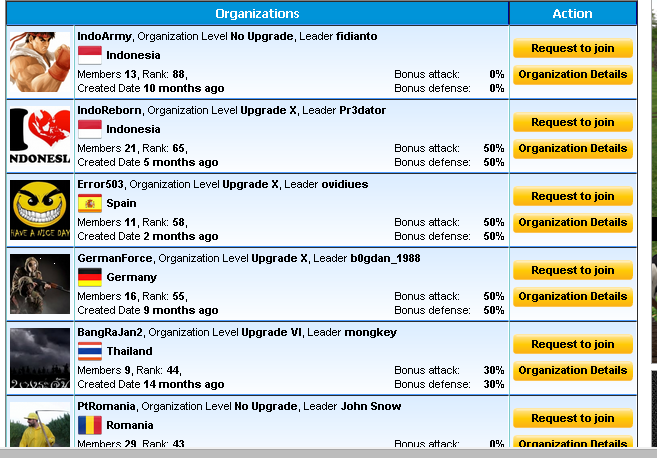
In this section, you can see a list of the Organizations from Your Country. You can apply to become a member only for the Organizations in your country. In order to become a member, your application must be accepted by the Leader of the Organization. Each Organization will have a ranking established depending on the medals owned by the members of the respective Organization. In order for the respective Organization to attack a territory, the Ranking of the Organization must be higher than the attacked territory's Ranking. If the organization's ranking is not higher, it will not be able to attack that territory.
ORGANIZATION
Organizations – Global Organizations
In this section, you can see a list of all the Organizations in MarketGlory. You can apply to become a member only for the Organizations in your country. In order to become a member, your application must be accepted by the Leader of the Organization.
Organizations – Members
Here you can see all the members of the Organization to which you belong. You can sort the members by their level (Veterans, respectively Fighters). You also have a list of all the applications for the Organization to which you belong. Moreover, you can see the Organization Fund, and you can distribute it or you can invest Gold. The distribution can be made only by the Leader or the Officers, while the investment can be made by any member. If an Organization dismisses a member, the Organization will pay the value of his/ her most valuable medal in GOLD, medal which the user will lose. If the respective user decides to quit the Organization and he/ she is not dismissed by the leader, he/ she will lose his most valuable medal, but its value will not be paid by the Organization.
Organizations – Barracks
In this section you can see the levels of Upgrade which can be made by your Organization, and the costs corresponding to each level. The Upgrade can be done only by the Leader of the Organization and it is active for a month, but it can be extended anytime. If an Organization dismisses a member, the Organization will pay the value of his/ her most valuable medal in GOLD, medal which the user will lose. If the respective user decides to quit the Organization and he/ she is not dismissed by the leader, he/ she will lose his most valuable medal, but its value will not be paid by the Organization.
Organizations – Territories
Here you have a list of all the territories under your influence. You can also view the Organization Fund, and to distribute it or invest Gold in it. The distribution can be done only by the Leader and the Officers, while the investitions can be done by any member.
Organizations – War
Here you can see the list of the Wars in which you took part as an Attacker (War history). You can also view the Organization Fund, and to distribute it or invest Gold in it. The distribution can be done only by the Leader and the Officers, while the investitions can be done by any member.
Organizations – Financial Assets
In this section you have a list of all the currencies from the Organization Fund. The Leader and the Veterans of the Organization can change the currencies on the Financial Market. Moreover, you can see the Organization Fund, and you can distribute it or you can invest Gold. The distribution can be made only by the Leader or the Officers, while the investment can be made by any member.
Organizations – Transactions
In this section you have the list of all the transactions which take place in the Organization Fund. Moreover, you can see the Organization Fund, and you can distribute it or you can invest Gold. The distribution can be made only by the Leader or the Officers, while the investment can be made by any member.
Create Organization
Here you can create your own Organization. You can choose a name and a logo for your Organization, which cannot be changed afterwards. An Organization can be created at the cost of 5 euro.
In order to create an organziation, you need 5 euro, 10 experience points, and at least one medal.
ALLIANCES
Alliances
Here you can see a list of all the Alliances in Market Glory, or you can select only those Alliances which have free slots. You can Request to join in any Alliance you want. You can also see the details for each Alliance: the name of the Alliance, the date it was opened, the damage, the number of territories under occupation and which are those, the penalty for the occupied territories, the Alliance Leader with details (date when the Organization was created, upgrade, number of members, damage, the user who is Leader) and the Alliance Members with details (date when each Organization was created, upgrade of the Organization, number of fighters, damage, the user who is leader of each Organization, etc.). Each Organization will have the possibility of entering an Alliance with maximum two other organizations. . Only the Leader of an Organization will be able to form an Alliance, having also the possibility of accepting or denying the requests of other organizations to become part of the Alliance.
Create Alliance
This is where you can create your own Alliance, if you have an Organization. You can choose the name of the Alliance and its logo. After that, you can manage your alliance. The cost for creating an Alliance is 200 Gold. Each Organization will have the possibility of entering an Alliance with maximum two other organizations. Only the Leader of an Organization will be able to form an Alliance, having also the possibility of accepting or denying the requests of other organizations to become part of the Alliance. All requests must be approved or rejected in maximum 7 days.
Alliance Settings
Here you can see different details for your Alliance, such as: name, rank, country, date it was created, attack and defense bonus, number of fighters, damage and the user who is leader. You can also see the territories under occupation, the user who is Emperor in each of the territories, the warfund at the moment and when the protection for these territories ends. Each Organization will have the possibility of entering an Alliance with maximum two other organizations. Only the Leader of an Organization will be able to form an Alliance, having also the possibility of accepting or denying the requests of other organizations to become part of the Alliance.
All requests must be approved or rejected in maximum 7 days. If you are the Leader of the Alliance, you can accept other Organizations in your Alliance or you can dismiss members. If an Alliance dismisses an Organization, it will pay for each member of the Organization the most valuable medal. The members of the Organization will lose those medals. If an Organization quits the Alliance, and it is not dismissed, all members will lose the highest medal without being paid for them. An Organization will have the possibility to quit the Alliance after 30 days since it has been accepted in that Alliance. Also in order to quit, the Alliance must not be involved in a war.
WAR VIDEO
MarketGlory is a online browser game strategy game in which you have the possibility to convert your virtual currency into real money join now
In MarketGlory, you can see different ranking of all the users, sorted by various criteria.
The first criterion is Top Incomes, displaying a list of users depending on their incomes.
The Incomes represent the total money a user has earned so far, since registration, converted in Euro.
The second sub-menu displays a list of all MarketGlory users, depending on their Productivity level.
The Euro Stock and Gold Stock sorts the users by the quantity of currencies they own at the moment.
In the Top Referrals section, you see the list of users depending on the number of referrals they have.
The Energy menu displays the ranking of the users, depending on the Energy level they have.
In Top Bids you can see a top of the MarketGlory users, sorted by the sums they were bid with. The sums are in Gold.
All the rankings are automatically updated.
RANKING VIDEO
MarketGlory is a online browser game strategy game in which you have the possibility to convert your virtual currency into real money join now for free
PARTNERS
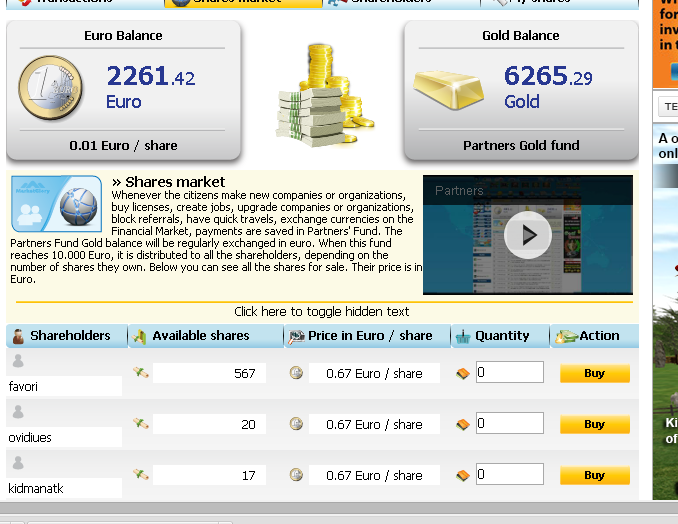
In this section you can buy MarketGlory game shares.
When the balance reaches 10,000 euro, you will receive 1 cent for each share you hold. You can sell and buy shares from other players. The gold balance is regularly exchanged in Euro.
Euros are added to the game fund balance whenever the citizens open companies or organizations, buy licenses, create jobs, upgrade companies or organizations, block referrals, have quick travels, exchange currencies on the Financial Market, withdraw money from the game etc.
There are also negative transactions in the Partners’ Fund. Whenever a user invests money in the game, 20% of the sum invested is withdrawn from the Partners’ Fund and distributed to the master of that user (10%) and to the government of the country where that user is registered (10%).
PARTNER VIDEO
Partners – Transactions List
Whenever the citizens open companies or upgrades them, buy licenses, create jobs, block referrals, have a quick fight or a quick travel all payments are saved in shares fund. The Partners Fund Gold balance will be regularly exchanged in euro. When this fund riches 10.000 Euro, it is distributed to shareholders depending on the number of shares they own, 0.01 Euro/ share. Here you can see all the transactions in the Partners' fund.
Partners – Shares Market
Here are all the shares for sale. Their price is in Euro.
Partners – Shareholders
Here is a list of all the Shareholders, sorted by the number of shares they own.
Partners – My shares
Here is a list of your shares and you can put them for sale, on the Shares market.
In MarketGlory, you can invest money, in order to develop your character faster.
The investments can be done directly, through Credit Card.
Choose the pack you want, and you will receive a bonus of Experience points, depending on the sum you invest.
Click on invest,
fill out the form, then Place the order.
You can also use other methods of investment, through resellers, and you will receive a bonus of experience points for your investments higher than 18 Euros, depending on the sum invested.
Browse the Reseller list and choose the reseller who has the most advantageous method for you.
In the Details section,
you can see all the payment methods and the details for each reseller.
promotional Experience
MarketGlory also gives you the opportunity you to buy two promotional Experience packs, through resellers.
You can either buy a pack of 100 experience points at the cost of 20 Euros, or 300 experience points at the cost of 40 Euros.
These packs can be bought once a year, each.
In the Invest Euro Section, you also have the possibility to transfer money to GoalTycoon, by using the Game-to-Game transfer. You can only transfer integer sums.
You can withdraw money
from the game in the Withdraw Euro section. The minimum payout is 20 euro.
For each withdrawal from the game, you will pay a fee of 20% of the sum withdrawn.
Add a new method or choose one of the methods you have already edited, then send the request.
All the users transactions are carefully checked before the request is approved.
The withdrawals from the game are completed by the resellers.
INVEST AND WITHDRAW VIDEO
CONTINUE READ BELOW: RESELLER Reseller – Apply for Reseller
In order to diversify the investment and withdrawal methods, the transactions through Resellers are possible. The Reseller can invest for other Marketglory users who do not have the possibility to invest directly. The Reseller can choose the payment method and set the percentage distributed to the requester. Any Marketglory user may become a Reseller, if approved by the administration of the game. The first step is to Apply to become a Reseller. After you are approved by the administration of the game, in order to be activated, you must first invest 200 Euro in your Reseller account, and afterwards you can invest at least 100 Euro in your Reseller account each time you need. The sum is deposited in your Reseller account, which is different from your user account. A Reseller must always have minimum 100 Euro in his Reseller account in order to be active and visible in the list. When the Resellers invest in their Reseller accounts, they must fill a form and choose the most suitable payment type for them.
The Reseller has the obligation to invest in the requesters' accounts the percentage of the sum agreed by both parties, according to the public offer. The administration of the game has the right to withdraw anytime the Reseller status to the users who do not respect the rules of this status.
As a Reseller, you can invest any sum for the requesters, there is no minimum limit. The requester will receive, besides the invested sum, experience points, as following:
between 18 and 44 Euro - 4 experience points;
between 45 and 89 Euro - 12 experience points;
between 90 and 474 Euro - 25 experience points;
between 475 and 999 Euro - 150 experience points;
over 1000 Euro - 300 experience points.
A Reseller can also process withdrawals for other users. When the users withdraw money from their accounts, they are carefully checked by the MarketGlory Financial Department, and then approved for Resellers. Their request becomes visible in a public list for all the Resellers, and the first Reseller who accepts a request must complete it and upload a PrintScreen with the payment proof.
Visit Resellers List
MarketGlory offers you the opportunity to invest through other users, who have the Reseller status. In this section of the game, you have a list of all the MarketGlory users who have the Reseller status, ordered by the sum they have in their Reseller account at the moment. You can also see the Details regarding the Reseller activity of each user in the list. If you click on Details, you can invest through the Reseller you have chosen. Choose the payment method you want to use, set the amount or choose one of the available XP packs, and then simply Send your request. You can also write a comment regarding that Reseller, and you can see a list of all the investment they processed so far.
My Requests
If you already are a Reseller, you can see a list of all the requests other users have sent to you. There are three categories of requests, and you can sort all the requests by these: New Requests, Approved Requests and
Denied Requests.
Settings
Here you can add any payment method you want to process. You need to add the Payment Method, the Percentage which goes to the user, and you can also add other Details, if you wish. After that, you can Delete or Edit any of the payment methods you have previously set.
Withdraw List
This is a list of all the withdrawal requests made by the users. You will only see the withdrawals which have not yet been accepted by another Reseller. If you click on Details, you can see the ID of the withdrawal, the username, the date when they registered, the amount they requested the payment method, and the details corresponding to that method. By clicking 'OK', you confirm that you will operate this withdrawal. Please make sure to save the transaction details in your computer so that you have them when needed.
Accepted Withdrawal List
This is a list of all the withdrawals you have already accepted. After you have completed a payment, you need to upload a PrintScreen with the proof of the transaction from this menu. The payment confirmation you upload must be png, jpg, jpeg format and not larger than 2MB.
Withdrawal History
In this menu, you can see the list of all the withdrawals you have completed so far.
Invest in your Account – Credit Card
NOTE:
If you want to evolve faster in the game, MarketGlory gives you the opportunity to invest money, which can be converted into virtual currency. MarketGlory Euro is a virtual currency which is the main reference point for all the local virtual currencies used in the game and it is used to buy a variety of items within the game.
Warning! Processing payments may take up to 24-48 hours.
Deposits are made in Euros and are non-refundable. Deposits will be made depending on the amount credited to the SC EUROSOFT SYSTEM SRL accounts, but SC EUROSOFT SYSTEM SRL does not cover the fees regarding the transaction. For deposits made in RON, we will consider the exchange used by BNR that day. After the product selection you will have to fill a form with the information about the payment method. These will be sent for processing. All data you fill is fully confidential. If the transaction is successful, the next screen will offer you information about your order. This information will also be sent by e-mail.
MarketGlory offers you a Bonus of Experience Points, for every investment in the game, as following:
the 20 euro pack - 4 experience points;
the 50 euro pack - 12 experience points;
the 100 euro pack - 25 experience points;
the 500 euro pack - 150 experience points;
the 1000 euro pack - 300 experience points;
This bonus of experience will be given for each investment in the user account.
Game-To-Game Transfer
If you have a GoalTycoon account linked to your MarketGlory account, you can transfer money from MarketGlory to GoalTycoon. The payments are instant. There is no minimum sum you can send to your GoalTycoon account, the only condition is that you must send an integer sum.
Choose your Start-Up
MarketGlory brings you two promotional investment packs. You can now buy 100 experience points, at the cost of 20 Euro, or 300 experience points, at the cost of 40 euro. You can benefit from each of these packs once a year, and only you can only order them through a Reseller. The Experience is an important factor in calculating productivity. A higher Experience will also increase your Productivity and you will be able to enter more rapidly in the economic circuit. This means that the work bonus you will receive for 3 days worked in a row and the salaries will be substantially higher. Contact a Reseller if you want to order an XP Pack.
Resellers List
In order to diversify the investment and withdrawal methods, the transactions through Resellers are possible. The Reseller can invest for other Marketglory users who do not have the possibility to invest directly. The Reseller can choose the payment method and set the percentage distributed to the requester.
The Reseller has the obligation to invest in the requesters' accounts the percentage of the sum agreed by both parties, according to the public offer. A Reseller may invest any sum for the requesters, there is no minimum limit. The requester will receive, besides the invested sum, experience points, as following:
between 18 and 44 Euro - 4 experience points;
between 45 and 89 Euro - 12 experience points;
between 90 and 474 Euro - 25 experience points;
between 475 and 999 Euro - 150 experience points;
over 1000 Euro - 300 experience points.
Withdraw Euro
Any MarketGlory user has the possibility to convert the virtual currency into real money and withdraw that money. Keep in mind that when a withdrawal is made, a 20% fee will be hold from the amount you withdraw. As a result this fee will be added to the Partners’ Fund. Choose the amount you want to withdraw and choose your preferred method. If you have already made a request before, you can choose from the payment methods already saved by you. If this is your first withdrawal, you need to add the payment method first. Money transfers will be made only if the amount requested is higher than 20 Euro.
Note: You should complete the information necessary for the withdrawal. Only if you provide real information the withdrawal can be made. All information is strictly confidential.
All payments are processed by the MarketGlory Resellers. When your payment is accepted by a Reseller, you will receive a message in your Inbox, informing you about the Reseller who accepted your transaction. Any withdrawal takes from 2 up to 7 business days to be completed.
Local Market
In this section you can see all the offers of the companies from the country you are in and the available business licenses.
Note that the products are sorted by category and quality. Raw materials and licenses can be purchased only by companies. You can buy from the local market only using the local currency of the country. If you want to see more information about a specific type of product, click on it
Global Market
In this section you can see all the offers of the companies from outside the country and the available business licenses.
Note that the products are sorted by category and quality. Raw materials and licenses can be purchased only by companies. You can buy from the local market only using Gold. You cannot buy products from your own country on the Global Market. If you want to see more information about a specific type of product, click on it.
Financial market
In this section you can convert your Euros into any currency you own. Note that in MarketGlory there are over 80 currencies and each country operates with its own currency. The exchange rate is fluctuating and increases/ decreases with every buying / selling Gold on the Financial Market.
You can develop your broker abilities on the financial market and obtain profits by transactions with the national currencies. Note that for every transaction on the financial market, you will pay a tax of 3% of the value of the transaction, and this fee is paid exclusively in Gold. This tax goes to the Partners’ fund.
Referral Auction
In this menu you can find the referrals put for auction. The initial term of an auction can be between 1 and 7 days. During the auction, if a user bids in the last 3 minutes before the auction ends, the term of the auction will be prolonged with another 3 minutes. The price is in Gold. You can bid only if you have the necessary amount of Gold in your account. If someone overbids you, the amount you bid will be returned to your account.
Company Auction
In this menu, you can find the companies put for auction. The initial term of an auction can be between 1 and 7 days. During the auction, if a user bids in the last 3 minutes before the auction ends, the auction will be prolonged with another 3 minutes. You can bid only if you have the necessary amount of Gold in your account. When you bid, you are withdrawn the sum you bid from your account. If someone outbids you, the sum is given back into your account. The prices for companies are in Gold. The free companies cannot be put for sale.
MARKET VIDEO
INVENTORY
My inventory – Profile Settings
Here you can check and update your profile.
My inventory – Transactions
In this section you can see all your transactions, and you can sort the transactions by currencies: Euro, Gold or Other currencies.
My inventory – Assets
In this section are presented all your financial and non-financial assets (companies, shares).
Blocked Referrals:
In this section are the referrals you have. You gain a referral if you challenge an opponent to fight and win the fight. You lose a referral if you do not block him/ her and they become available for fight. Your referrals will pay a fee up to 25% of their earnings, depending on the energy level you have (higher energy = higher earnings). You receive 10% of their incomes, no matter what your energy level is, and the rest of 15% will be given to you depending on your energy level. If you block a referral, he / she cannot be attacked.
A user who registers through your affiliate link will become your referral, blocked for 100 days. You can block any referral you have for 0.8 euro/ 30 days.
Free referrals
In the list below you can see the referrals you have. You gain a referral if you challenge an opponent to fight and win the fight. You lose a referral if you do not block him/ her and they become available for fight. Your referrals will pay a fee up to 25% of their earnings, depending on the energy level you have (higher energy = higher earnings). You receive 10% of their incomes, no matter what your energy level is, and the rest of 15% will be given to you depending on your energy level. If you block a referral, he/ she cannot be attacked.
A user who registers through your affiliate link will become your referral, blocked for 100 days. You can block any referral you have for 0.8 euro/ 30 days.
Auction Referrals
From this menu, you can put your referrals for auction. You can put for auction any referral from your blocked referrals list, who has logged in at least once in the past 3 days, who is blocked by the master for at least 7 days and who is not currently put for auction. When you register a referral for auction, you will pay a registration tax of 25% of the starting price, to the Partners' Fund. When the auction ends, a tax of 25% of the difference between the final price and the starting price is paid to the Partners' Fund. The initial term of an auction can be set between 1 and 7 days, when the referral is put for auction, regardless of the starting price and the registration tax. During the auction, if a user bids in the last 3 minutes before the auction ends, the term of the auction will be prolonged with another 3 minutes.
On-Auction Referrals
From this menu, you can see the referrals you have put for auction. You can put for auction any referral from your blocked referrals list, who has logged in at least once in the past 3 days, who is blocked by the master for at least 7 days and who is not currently put for auction. When you register a referral for auction, you will pay a registration tax of 25% of the starting price, to the Partners' Fund. When the auction ends, a tax of 25% of the difference between the final price and the starting price is paid to the Partners' Fund. The initial term of an auction can be set between 1 and 7 days, when the referral is put for auction, regardless of the starting price and the registration tax. During the auction, if a user bids in the last 3 minutes before the auction ends, the term of the auction will be prolonged with another 3 minutes.
My inventory – Food
In this section, you can see all the Food you have in your Inventory. The Food is consumed every 6 hours, at 03.15, 09.15, 15.15, 21.15 server time. When the Food is consumed, you receive the points of energy corresponding to each quality:
Low Quality - 1 point,
Normal Quality - 3 points
High Quality - 5 points
If you have Food of different qualities, the first to be consumed will be the one of superior quality. You also have a timer, which shows the time left until the next meal is taken. The energy decreases by:
5% each hour
10% when you fight
50% when you work
My inventory – Coffee
In this section, you can see all the Coffee you have in your Inventory. The Coffee is consumed whenever you decide. When the Coffee is consumed, you receive the points of energy corresponding to each quality:
Low Quality - 1 point,
Normal Quality - 3 points,
High Quality - 5 points
If you have Coffee of different qualities, the first to be consumed will be the one of superior quality. You can have an unlimited number of Coffees each day. The energy decreases by:
5% each hour
10% when you fight
50% when you work
My inventory – Clothes
In this section, you can see all the Clothes you have in your Inventory. The energy for Clothes is distributed each hour. Therefore,
for Low Quality Clothes you will receive each hour 1/24 points of energy,
for Normal Quality Clothes you will receive 3/24 points of energy each hour,
for High Quality Clothes you will receive 5/24 points of energy each hour
The Clothes last for 10 days since buying. If you have Clothes of the same type, they will be consumed consecutively, starting with the ones of superior quality. If you have Clothes of different types, they will be consumed altogether. The energy decreases by:
5% each hour
10% when you fight
50% when you work
My inventory – Books
In this section, you can see all the Books you have in your Inventory. You can read only one Book in 24 hours. You will receive
1 point of Knowledge for Low Quality Books,
3 points of Knowledge for Normal Quality Books
5 points of Knowledge for High Quality Books.
If you have more Books in your Inventory, the first to be consumed will be those of superior quality.
The Knowledge decreases each day by:
0.2 points if your Knowledge is between 1 and 100,
0.4 points if your Knowledge is between 100 and 500,
0.6 points if your Knowledge is between 500 and 1000.
My inventory – Real estate
In this section, you can see all the Real estate's you have in your Inventory. The energy for Real estate's is distributed each hour. Therefore:
for Houses you will receive 7/24 points of energy each hour,
for Villa you will receive 20/24 points of energy each hour,
for Palace you will receive 35/24 points of energy each hour
The Real estate's last for 30 days since buying. After you buy a Real estate, you can either move in and receive the points of energy, or you can put them for rent. The energy decreases by:
5% each hour
10% when you fight
50% when you work
My inventory – Transport
In this section you can see the total stock of Gasoline and Kerosen you have and also the number of Cars and Airplanes. In order for the Cars and Airplanes to be used, make sure that you have enough fuel on stock. The Cars and the Airplanes can be used for personal transportation, or they can be rented.
My inventory – Weapons
In this section, you can see all the Weapons you have in your Inventory.
The Low Quality Weapons last for 5 fights
The Normal Quality Weapons last for 15 fights
The High Quality Weapons last for 25 fights
The Weapons are consumed in Referral Fights, Arena Fights or Wars, no matter if you attack or if you are attacked. If you have Weapons of the same type, they will be consumed consecutively, starting with the ones of superior quality. If you have Weapons of different types, they will be consumed altogether.
DIGIPASS
This tutorial presents the newest application made by our team, the Digipass.
DIGIPASS VIDEO
You can download the Digipass application from the Download MG button bellow the Invest/Withdraw menus.
The first step is to install the application on the device you are using.
To install it, you need to double click it, then press RUN and select where you want to install it.
After the application is installed you need to log into it using the data from your MarketGlory account, the username and password.
Digipass functions on various operating systems such as Windows XP SP3, Windows Vista, Windows 7 and Windows 8.
If you use the Digipass application to access your account when you close it you will be signed out of your account.
After closing it, if you open it again, it will directly open your MarketGlory account in the implicit browser you use.
MarketGlory is a online browser game strategy game in which you have the possibility to convert your virtual currency into real money join now
Workplaces
Here you will find the available workplaces. Your wage will be calculated according to your Productivity. For each day of work you will receive the wage and at least 0.7 Experience Points. If you work day by day, your Experience will increase.
You can receive an Experience bonus each time you work, if you have active referrals, as following:
for 1 active referral - 1 point per day;
for 2 active referrals - 1.5 points per day;
for 3 active referrals - 2 points per day;
for 4 active referrals - 2.5 points per day;
for 5 or more active referrals - 3 points per day.
Active referral means that they should have the energy level higher than 1 at 11.30 a.m. server time, and they should have logged in the previous 24 hours.
You can buy experience in amount of:
0.5 euro for each experience point when you have between 1 and 100 experience points,
0.45 euro for each experience point when you have between 100 and 500 experience points,
0.4 euro for each experience point when you have between 500 and 1000 experience points.
The money from purchasing experience points are transferred to the Government Funds of the country you are citizen of. The experience points fall each day by 0.3%.
Remember that for 3 consecutive days of work you will also receive The Work Bonus from The Government. You can only work once in 24 hours. In order to receive the work bonus, you need to work for 3 days in a row. If you skip one day, the bonus will not be given, until the 3 days in a row are completed. The Workplaces are sorted by the salary given by the company. The salary is displayed for 8 hours of work, for maximum productivity (1000).
The salary you receive can be calculated using the following formula:
the displayed salary / 1000 * your productivity.
Worklog
In this section you can see your Worklog.
For each day of work you will receive the wage and at least 0.7 Experience Points.
You can receive an Experience bonus each time you work, if you have active referrals, as following:
for 1 active referral - 1 point per day;
for 2 active referrals - 1.5 points per day;
for 3 active referrals - 2 points per day;
for 4 active referrals - 2.5 points per day;
for 5 or more active referrals - 3 points per day.
Active referral
Active referral means that they should have the energy level higher than 1 at 11.30 a.m. server time, and they should have logged in the previous 24 hours.
Active Referrals Update
In the following days we will make some modifications to the Referrals section. They will be divided into two categories: Beginners and Advanced.
There will be a ranking that will make this delimitation, the beginners being the users that produce below 2 Euros/month for their masters and the Advanced being the users that produce more than 2 Euros for their masters monthly. The productivity will be calculated in Euros, all currencies being converted by approximation. .
The Advanced will only pay the taxes, while the Beginners will offer all benefits if they are active.
A Beginner will be considered active if he meets one of the following conditions:
1. has more than 5 Energy but no referral fights.
2. has below 5 Energy but has at least 5 referral fights given.
3. both conditions mentioned previously.
The referral ranking will be updated on the 1st day of each month, taking into consideration the data from the previous month. For example if your referral produces in December more than 2 euros, in January he will be considered Advanced.
The Affiliates system remains the same.
Work Bonus
Remember that for 3 consecutive days of work you will receive also The Work Bonus from The Government, depending on your productivity. In order to receive the work bonus, you need to work for 3 days in a row. If you skip one day, the bonus will not be given, until the 3 days in a row are completed. The Work bonus is calculated by the following formula:
the maximum bonus / 1000 * your productivity.
Buy Experience
The experience level increases each time you work by at least 0.7 points. If you work day by day, it will increase.
You can buy experience in amount of:
0.5 euro for each experience point when you have between 1 and 100 experience points,
0.45 euro for each experience point when you have between 100 and 500 experience points,
0.4 euro for each experience point when you have between 500 and 1900 experience points,
The money from purchasing experience points are transferred to the Government Funds of the country you are citizen of.
The experience points fall each day by 0.3%.
WORK VIDEO
NEXT IS REFFERAL FIGHT
Refferal Fight
In this section the opponents available for fighting are presented. If you win a battle you will receive the bonus offered by the Government according to the energy you have when the fight is over. Remember that the loser becomes your referral until the end of the day and they will pay taxes to you. If you want to be sure that you will not lose that referral, you can block them for as long as you want. A fight lasts for 10 minutes, during which you cannot be attacked and you cannot open new fights. For each fight you are involved in, your energy decreases by 10%, no matter if you attack or if you are the one attacked.
You can also see your fight history, where all the fights you were involved in are shown. Beware: if you have weapons, they will also be consumed in these fights for referrals. A referral can be blocked for at least 30 days, for the price of 0.8 Euro. The referrals can be blocked from the Referral/ Free referrals menu.
Users are sorted by last login descending, defense descending and energy descending modes.
Fight – Fight History
Here are the battles that you fought in. You can attack 10 times each day. A fight lasts for 10 minutes, during which you cannot be attacked and you cannot open new fights. Remember that if you have weapons, they will be consumed in the Referral Fights. If you win a battle you will receive the bonus offered by the Government according to the energy you have.
Remember that the loser becomes your Referral until the end of the day and he will pay you taxes. If you want to be sure that you will not lose that referral, you can block him for at least 30 days, at a cost of 0.8 Euro. For each fight you are involved in, your energy decreases by 10%.
From the Make new company menu, you can choose from over 44 companies the one you want to open. Setting up a company costs 10 euro. You will get a free workplace and a license valid for 90 days.
Opening a Newspaper or a Cow Farm is free.
For each company you can see a detailed description. You can hold an unlimited number of companies.
In order to manage a company, click on the Manage button next to it.In your inventory menu you can view the raw materials you have and the cost of their acquisition, the final products stocks and the production cost. Also, here you can put goods on sale on the Local or Global market.
MY COMPANIES
In this menu, you can find the companies put for auction. The initial term of an auction can be between 1 and 7 days. During the auction, if a user bids in the last 3 minutes before the auction ends, the auction will be prolonged with another 3 minutes. You can bid only if you have the necessary amount of Gold in your account. When you bid, you are withdrawn the sum you bid from your account. If someone outbids you, the sum is given back into your account. The prices for companies are in Gold. The free companies cannot be put for sale.
My companies - Inventory
In your inventory menu you can view the raw material stock, the final products stocks and the costs of their acquisition and production. Also, in this section you have the option to put goods on sale. You can decide on selling goods on the Local or Global market. In order to sell your products on the Local Market, you need to set the price only in Local currency. The products will be displayed on the Local Market of the country where your company is located.
In order to sell your products on the Global Market, you need to set the price only in Gold. Your products will be available for all the countries in MarketGlory, except for the country where your company is located. Remember that you will pay a fee to the GM Fund for each product you sell on the Global Market. This tax is established by the Government of the country where your company is located and it can be seen in Government/ Taxes. We strongly recommend you to take into consideration the value of the tax before you put your products on sale on the Global Market.
In order to sell your products in GoalTycoon (for the companies which have this option), you need to sell the price only in Euro. For all the products sold in GoalTycoon, you will pay a fee of 25% of the price. If you set the prices in all the currencies (local currency, Gold and Euro), your products will be available on all the markets. In Production, you can see all the users who worked for your company, and the amount they produced. In Sales, you can see all the products you have sold and the users who bought them, while in Purchases you can see all the raw materials you bought for your company and the prices of acquisition.
My Companies - Production
In Production, you can see all the users who worked for your company, and the amount they produced.
In Sales, you can see all the products you have sold and the users who bought them, while in Purchases you can see all the raw materials you bought for your company and the prices of acquisition.
My companies - Workplaces
In this section you can create new jobs. You can set the number of jobs you want to open and you will see the price for them. Each job can be administrated individually, with the possibility to set the salary offered and to suspend or activate it.
My companies - Work Register
In this section you can view a list of citizens who have worked for your company, the time when they have worked, the productivity they had and also the salary that the company has paid to the citizen.
My companies - Financial
Each company has its own budget. In this section you can invest and withdraw money from the company. In the company you can invest and withdraw gold, integer sums only.
After you have invested gold you can change the company money in the local currency of the country where the company was founded.
When you want to withdraw money from the company, buy gold within the company and withdraw gold. Note that for each withdrawal you will pay a tax of 5%. This tax is divided between the master and the Government of the country where the company is located. The master can receive from 0% up to 4%, depending on the energy level he/ she has, while the Government takes the rest (up to a total of 5%).
Here you also have a list of all the transactions made by the company.
My companies - Licenses
In this section you can view what licenses you can purchase for your company. Each license is explained in detail: how many productivity points are required and the raw materials you need for the products. When you have a valid license or you purchase a license, the date when this license expires will be displayed.
Each license is valid for 90 days. From the company, you can extend the license validity, or buy a different license, if the company allows it. Even if a license expires you can still sell the products in stock, but you will not be able to produce goods anymore. Each type of company has specific licenses.
My companies - Settings
From the “Settings” menu, you can change the description of the company and the logo.
My companies – Special Products
This section is dedicated to Cheese Production, Winery and Newspaper. For Cheese Production and Winery, in this section you can see the products you have on stock and the age of each product. For Newspaper, you can see the articles you have created so far and you can add new articles.
My companies - Upgrade
Companies can be upgraded to produce goods at lower costs and thus your company can be more efficient on the market. There are 5 levels of upgrade:
Upgrade 1 = 10% productivity = 10 euro
Upgrade 2 = 20% productivity = 20 euro
Upgrade 3 = 30% productivity = 40 euro
Upgrade 4 = 40% productivity = 80 euro
Upgrade 5 = 50% productivity = 160 euro
You can temporarily upgrade your company, on a determined period of time from the “30 days upgrade” sub-menu. When you upgrade it temporarily, you will not be able to buy another upgrade or change the level of the temporary upgrade, for as long as the temporary upgrade is valid. The temporary upgrade takes into account the level of upgrade which has been bought. The prices for renting are the following:
Upgrade 1 = +10% productivity = 0.5 euro
Upgrade 2 = +20% productivity = 1 euro
Upgrade 3 = +30% productivity = 2 Euro
Upgrade 4 = +40% productivity = 4 Euro
Upgrade 5 = +50% productivity = 8 Euro
Make new company
Setting up a company costs 10 euro. You will get a workplace and a license for 90 days. Opening a newspaper is free. There are 44 types of companies. For each company you can see the description (the raw materials needed, the goods that can be produced) and what these goods are used for.
Company Auction
From this menu, you can put for auction any company from your companies list, except for the free companies. The price is in Gold. When you register a company for auction, you will pay a registration tax of 25% out of the starting price, to the Partners' Fund. When the auction ends, a tax on the transaction income of 25% out of the difference between the final price and the starting price is paid to the Partners' Fund. The initial term of an auction can be set between 1 and 7 days, when the company is put for auction, regardless of the starting price and the registration tax. During the auction, if a user bids in the last 3 minutes before the auction ends, the term of the auction will be prolonged with another 3 minutes.
Invest 2 Gold in company, in order to buy raw material (paper). You can buy your raw material either from the Global Market (in Gold), or from the Local Market (in local currency). In order to buy from the Local Market, you need to exchange Gold in local currency. You can do this from My companies/ Manage/ Financial. After you have invested in your company, exchange 1gold into the local currency of your company. You can do that from My Companies/ Manage/ Financial. Buy the raw material. Then activate a workplace from the Workplaces sub-menu and then set the salary. When a user works for your company, you will have products on the stock. From the sub-menu Special products, you can edit and publish your articles. You can publish only one article in 24 hours and you need to write a new article each day. In order to write your article, edit the content, save, then edit again, save, go to Modified Content and Publish. If you choose to publish your articles on the International Market, you and the citizens of the country your company is in will not be able to see the products on the market. When you have products on stock, set the price/ article and the quantity you put on sale. Set the price only in local currency if you want to sell them on the Local Market, and only in Gold if you want to sell them on the Global Market. Under the Sell button, you have another button, which activates or suspends your license. This means that you will no longer be able to produce any goods or sell them if you suspend your license. However, this does not extend the validity of your license. Also, remember that if you re-edit your article after you have published it, you will no longer see it on the market.
NEWSPAPER COMPANY DEMO
COW FARM COMPANY DEMO
Invest at least 2 Gold in company and then exchange 1 Gold into your local currency. After that, activate a workplace from the Workplaces sub-menu and then set the salary. When a user works for your company, you will have products on the stock. When you have products on stock, set the price and the quantity for sale. You can find your products in Local (Global - depending where you sell them) Market/ Raw Materials/ Food/ Raw Milk.
This product can only be bought by Milk Factories and Cheese Production.
MarketGlory is a online browser game strategy game in which you have the possibility to convert your virtual currency into real money
In the Arena you can fight with the MarketGlory citizens who have an Arena rank higher than Civilian. In order to fight, you need at least one weapon of attack, one of defense and 5 points of energy. The fights take place instantly. Each day you receive a bonus in euro, depending on your rank if you meet the requirements.
The weapons are consumed automatically, for each battle you take part in. In the Fighters section, you have a list of all the Fighters in the Arena, and the details for each.
You can also preview a Fight with each of them, if you click on the Preview button. In the Bonuses section, you have a list of all the bonuses and the Ranks in the Arena.
If you hold the mouse on each of these Ranks, you will see the description for each.
You can also see a Top of the Arena Fighters, a list of all the Transactions that take place in the Arena Fund, and the contribution of each country to the Arena Fund. free reg now
ARENA VIDEO
IMPORTANT
ARENA HAS UPDATES TO NEW SYSTEM!!!
NEW ARENA SYSTEM
The fights in the Arena will be held throughout the day, starting at 8 o'clock p.m. (server hour) in several rounds. Each fight contains up to 12 hits of 10 seconds each. The number of hits per fight depends on the damage given by each user and the remaining HP; each user will begin the fight with 1000 HP. The fight ends when the HP is 0 for one of the participants or they reach the 12th hit. During the fights you cannot purchase or consume goods that increase the energy (eg, cheese, coffee ...) or weapons. You will have available the option of automatic coffee consumption, just as in War or Training Ground. Between rounds there will be a break of about 5 minutes.
Each user can set up to 9 patterns, each consisting of six sets of attack and defense positions, choosing the exact point of attack / defense. During the battle, you can change the selected points in the 6 sets. Attention, you can change only the second point of attack / defense, not exactly the next one. Players will have the status of attacker / defender one at a time.
Registration in the Arena is based on the number of points had within it, the participants being selected with 2 minutes before 8 o’clock pm server time, being taken into ascending order according to the number of points owned in the Arena. To participate, a user must have at least one weapon of attack, a defense weapon, minimum 5 energy points and 5 Arena points. If a user has no opponent, he automatically wins the fight, being sent to the next round. The damage will be influenced by the weapons and depending on the body part you hit, you will be given a bonus:
- Head + 1000% dmg
- Body + 100% dmg
- Legs/Hands + 50% dmg
If the hit is outside the body, the damage will be 0.
The fights will take place both locally and globally. From the total number of participants per country, up to 15% of the best fighters will fight globally.
The winner of each fight will be the user with the most HP left at the end. If the HPs are equal, the user with the lower Arena rank will advance.
Arena – Bonuses
The total Arena Fund will contain the entrances of the previous day + 1% of previous fund. This fund will be equally divided in two sub-funds Local Fund and the Global Fund.
The Local Fund is divided to the total number of participants and the result is the amount per participant in Arena. For each country the number of rounds will be checked and the amount allocated per round will be the result. The amount allocated per round will be divided by the number of battles, the result being the bonus earned by each user. Please note, only winners will receive the Arena Bonus.
The bonus will be distributed starting at 5:05 am, server time.
The Global Fund is also divided between winners only. The Arena Bonus for the winners of the Global fights is calculated as follows: fund value / No. of rounds = the amount per round; the amount per round / No. of fights = fight bonus. T
The bonus is awarded starting at 10:05 am server time, not after each hit.
The Bonuses will be displayed for the previous day, not the current one.
My Refferal Won Arena
MarketGlory is a online browser game strategy game in which you have the possibility to convert your virtual currency into real money